Dataset browser
hotcoco ships a lightweight visual browser for COCO datasets — no FiftyOne, no heavy dependencies. Two entry points:
coco.browse()— launches inline in Jupyter; opens a local server otherwisecoco explore— CLI subcommand for standalone use
Both require the [browse] optional extra:
pip install hotcoco[browse]
Quick start
from hotcoco import COCO

coco = COCO("instances_val2017.json", image_dir="/data/coco/val2017/")
coco.browse()
That's it. A local server starts and a browser tab opens.
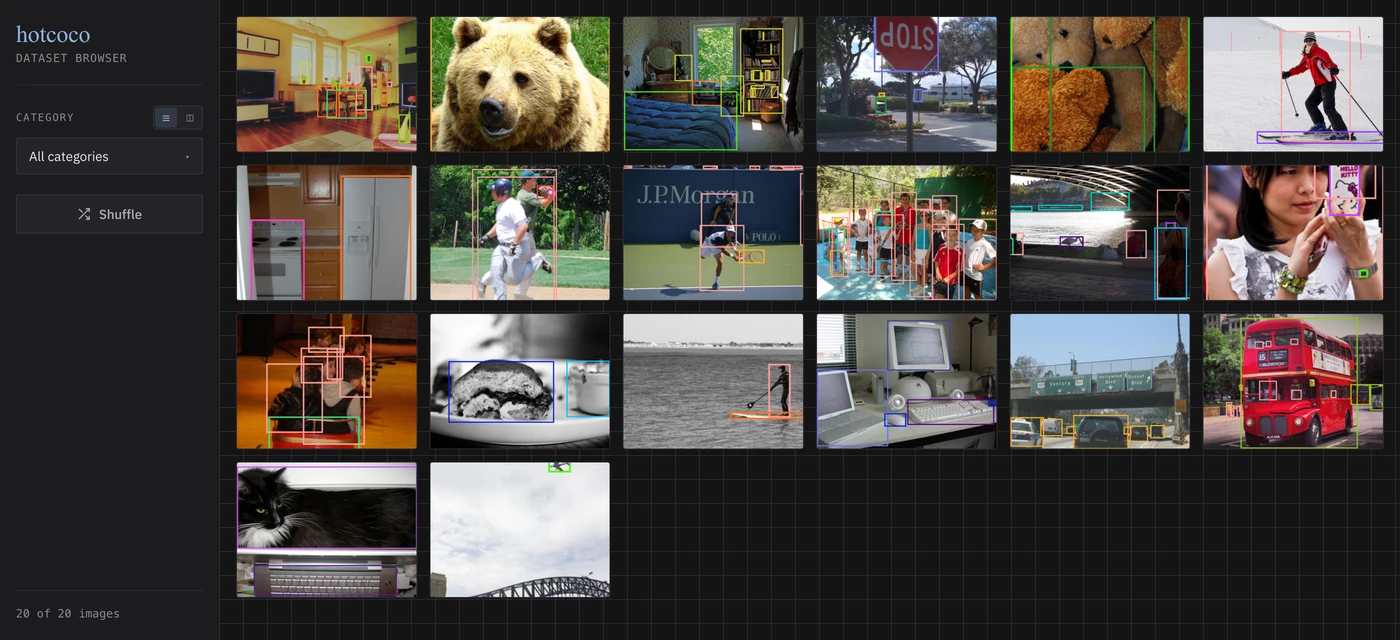
The coco explore subcommand does the same from a shell — see
CLI options.
UI overview
A filter sidebar sits beside an infinite-scroll thumbnail grid; clicking any thumbnail opens a lightbox with the full-resolution image, a canvas annotation overlay, and an annotation list.
Sidebar controls:
| Control | What it does |
|---|---|
| Category dropdown | Filter to images containing the selected categories (multi-select) |
| Min Score slider | Filter detections below a confidence threshold (when DT loaded) |
| Shuffle | Randomize the display order |
| N of M images | Live image count for the current filter |
Thumbnail grid:
- Annotated thumbnails with bounding boxes rendered server-side
- Infinite scroll — new batches load automatically as you scroll down
- Click any thumbnail to open the lightbox
Lightbox:
- Full-resolution image with a canvas overlay for annotations
- Hover any annotation to highlight it — the sidebar and canvas stay in sync
- Toggle layers (Boxes / Segments / Keypoints) and sources (GT / DT) instantly
- Scroll to zoom, drag to pan, double-click to reset
- Arrow keys navigate between images; Escape closes the lightbox
Viewing detections
Pass detection results to browse() and hotcoco overlays your model's predictions
alongside ground truth:
from hotcoco import COCO

coco = COCO("instances_val2017.json", image_dir="/data/coco/val2017/")

# Pass a path — auto-loaded via load_res()
coco.browse(dt="bbox_results.json")

# Or pass a COCO object you already have
results = coco.load_res("bbox_results.json")
coco.browse(dt=results)
From the command line:
coco explore \
    --gt instances_val2017.json \
    --images /data/coco/val2017/ \
    --dt bbox_results.json
What you get with dt loaded:
| Feature | Description |
|---|---|
| Score display | Confidence score shown on each detection label |
| Sources toggle | Show/hide ground truth and detections independently |
How ground truth and detections are told apart is in Annotation rendering. When no DT is loaded the browser behaves exactly as before (no slider, no source toggles).
Tip
Detections often lack segmentation masks. When segm is selected but a detection
has no mask, the browser falls back to its bounding box automatically.
image_dir
The browser needs to know where your images live. Pass it at construction:
coco = COCO("annotations.json", image_dir="/data/images/")
coco.browse()
Or set it after the fact:
coco = COCO("annotations.json")
coco.image_dir = "/data/images/"
coco.browse()
Or pass it directly to browse() (overrides image_dir on the object):
coco.browse(image_dir="/different/path/")
A subset made with filter, split, or sample keeps the parent's path — see
image_dir.
Annotation rendering
| Annotation type | How it's rendered |
|---|---|
| Bounding box | Canvas overlay — solid stroke for GT, dashed for DT |
| Oriented bounding box (OBB) | Rotated rectangle polygon — same solid/dashed convention; hover hit-testing follows the rotated shape |
| Segmentation | Canvas polygon fill + stroke |
| Keypoints | Dots + skeleton lines on canvas |
All annotations are rendered client-side on an HTML Canvas overlay, so they stay crisp at any zoom level. Colors are assigned per category deterministically — the same category always gets the same color across all images, and GT and DT share the palette so the two can be compared spatially.
If an image file is missing from image_dir, a gray placeholder is shown instead
of raising an error.
Responsive layout
The layout adapts from narrow Jupyter IFrames to wide standalone windows — controls collapse to a toolbar and the lightbox stacks vertically as the viewport shrinks.
CLI options
coco explore --gt <annotations.json> --images <images_dir/> [--dt <results.json>]
Every browse() argument has a flag; the full table is under
coco explore.
The browser and dashboard are fully self-contained — fonts and chart libraries are bundled with the package, so both work offline.
Advanced: create_app
For full control over launching, use create_app directly:
from hotcoco import COCO
from hotcoco.server import create_app, run_server

coco = COCO("annotations.json", image_dir="/data/images/")
app = create_app(coco, batch_size=24)
run_server(app, port=7861, open_browser=True)
create_app returns a FastAPI app. You can mount it inside a larger application
or run it with any ASGI server.
Eval dashboard
When you pass detection results, the browse server adds an interactive
Dashboard page at /dashboard. Navigate to it via the Gallery ↔ Dashboard
pills in the sidebar.
ev = COCOeval(coco, coco.load_res("results.json"), "bbox")
ev.evaluate(); ev.accumulate(); ev.summarize()

coco.browse(eval=ev, image_dir="images/")
# click "Dashboard" in the sidebar
The dashboard shows:
- KPI tiles — AP, AP50, AP75, AR100 at a glance
- PR curves — IoU-sweep precision-recall across 10 thresholds
- Per-category AP — ranked leaderboard with click-through to gallery
- Confusion matrix — interactive heatmap; click a cell to browse those misclassifications
- TIDE error breakdown — classification, localization, duplicate, background, missed
- Calibration — reliability diagram with ECE/MCE
- Per-image F1 — histogram colored by error profile (perfect, FP-heavy, FN-heavy, mixed)
- Label errors — suspected annotation mistakes; click a row to view the image
The sidebar always states the run's provenance, and a banner above the KPI
tiles flags a run that is not parity_verified — see
Check provenance before you publish a number.
All charts use the same dark theme as the gallery.